
Flutter vs React Native: Which framework is best for your app in 2025?
Learn how to choose between Flutter and React Native for your next mobile app development project.

Choosing between Flutter and React Native for mobile app development involves more than just comparing features. Each framework has its own set of strengths and weaknesses, as well as distinct use cases, making the decision important in multiple ways. This choice affects::
Your app’s long-term performance
Ease of maintenance
Speed of development
Let’s look at the practical differences between these two frameworks and examine some important considerations to consider as a developer.
What’s cross-platform development about?
The primary goal of both Flutter and React Native is to solve a common mobile development problem: managing two separate codebases for iOS and Android. Creating native apps has long been considered the gold standard for performance and user experience. However, the typical native development process has certain major drawbacks:
Increased cost: You have to maintain two separate codebases.
Complicated workflows: Teams need to duplicate their efforts.
Feature roll-out delays: Releasing updates across platforms can be slow.
Early solutions and their shortcomings
Before Flutter and React Native, there were early cross-platform solutions such as Cordova and Ionic. These frameworks employed web technology to construct mobile apps, however they frequently fell short in two important areas:
Performance: Web-based solutions couldn’t match the speed and responsiveness of native apps.
User Experience: Web technology layers made the apps feel sluggish and less polished.
These issues paved the way for newer cross-platform solutions, such as Flutter and React Native, which promise
Native-like performance without maintaining two codebases
Faster development times by sharing most of the codebase between platforms
However, both frameworks have their own set of obstacles, and recognizing them is critical to making the proper decision.
The appeal of cross-platform development
Cross-platform frameworks, such as Flutter and React Native, offer several appealing benefits:
Cost-efficiency: A unified codebase means lower development costs.
Faster time to market: Since the code is shared between platforms, you can roll out updates quicker.
Consistency: Design consistency across platforms becomes easier to achieve.
Despite these advantages, the reality of cross-platform development is more complex, with each framework introducing unique trade-offs. Understanding where each thrives and where they struggle will allow you to make an informed decision.
Choosing between Dart and JavaScript
One of the biggest distinctions between Flutter and React Native is the programming language they utilize. This language choice has a big impact on how easy it is to enroll developers and how well your project performs over time.
Flutter uses Dart, a relatively newer language developed by Google.
React Native relies on JavaScript, one of the most widely used languages in web development.
Dart (used by Flutter)
Dart comes with several notable benefits:
Ahead-of-time (AOT) compilation: Dart converts your code to native machine code ahead of time. This enables Flutter apps to launch quickly and efficiently, which is especially crucial for data-intensive apps or those with intricate animations.
Just-in-Time (JIT) compilation: Dart makes use of JIT during development, allowing for faster development cycles via hot reload. Changes to your app will be seen virtually immediately without the need to restart.
Dart’s ability to compile directly into native code can significantly improve performance, especially for apps that:
Handle a lot of data
Use complex animations
Require high responsiveness even under heavy loads
Drawbacks of Dart:
Learning curve: Dart is not as extensively used as JavaScript, thus developers who are familiar with JavaScript will suffer a learning curve. This may delay down the first stages of your project while developers become acquainted with Dart.
JavaScript (used by React Native)
JavaScript’s biggest advantage is its widespread adoption. Most development teams are already familiar with it, therefore React Native is an obvious choice for teams with JavaScript knowledge.
Widespread adoption: JavaScript is used in a variety of development environments, making it easier to find developers with the necessary skills.
Easy onboarding: Teams already working with React on the web will find the transition to React Native relatively straightforward.
Challenges with JavaScript:
Performance bottlenecks: React Native uses a JavaScript bridge to communicate with native components. This introduces some overhead, especially for complex user interfaces or animations. The need to pass through this bridge can slow down performance.
Optimization efforts: React Native introduced the Hermes engine to improve startup times and optimize JavaScript execution. While this engine helps, heavy apps with many complex interactions may still require additional performance tuning.
Key takeaways on languages
Go with Dart (Flutter) if performance is a top priority and you’re willing to invest in learning a new language. Dart’s ability to compile into native code gives it an advantage in apps with complex functionality.
Choose JavaScript (React Native) if you need to quickly get up to speed and are looking for ease of use with existing JavaScript knowledge. It’s also ideal for rapid prototyping.
UI Control: What level of customization do you need?
Another notable distinction between Flutter and React Native is how the frameworks handle the user interface. UI design influences how people interact with your app, and each framework provides varying amounts of power and customization.
Flutter’s approach to UI: Impeller rendering engine
Flutter uses the Impeller rendering engine by default on iOS, optimizing for smoother animations and reduced “jank” during interactions.
Flutter provides Material and Cupertino widgets that align with Android and iOS styles, minimizing the need to mimic native behavior while allowing for a consistent UI across platforms.
This control is particularly valuable for:
Apps that require custom designs or branding that doesn’t conform to standard UI elements.
Apps with unique layouts or complex animations that need fine-tuning.
Downsides of Flutter’s UI approach:
Since Flutter doesn’t use native UI components directly, the app may not feel as “native” as a React Native app.
Flutter provides widgets that mimic native components, but these aren’t identical, and users might notice slight differences in look and behavior.
React Native’s approach to UI: Native components
React Native uses actual native components to render the UI.
On iOS, buttons are actual UIButtons.
On Android, buttons are native Buttons.
This ensures that React Native apps feel more integrated with the platform and deliver a more familiar experience for users.
Advantages of this approach:
Apps feel native from the start.
You don’t need to mimic native behavior; React Native handles that for you.
Drawbacks:
For highly customized UIs, you may need to build custom components or use third-party libraries. This adds complexity to the project.
The reliance on native components can sometimes limit how much control you have over the design.
Key takeaways on UI customization
Flutter offers more customization control but sacrifices some native feel.
React Native provides a more natural native experience but limits your ability to customize UI elements without additional effort.
Ecosystem and libraries
Both Flutter and React Native have strong ecosystems, but each has its own strengths and limitations.
Flutter’s ecosystem
Google is supporting the rapid growth of Flutter’s ecosystem. Many packages providing essential functionality, such as state management and navigation, are accessible on pub.dev and are regularly updated.
However, because Flutter is newer than React Native, the ecosystem may have holes, particularly for specific functionalities.
In other circumstances, you may have to develop unique solutions or wait for the ecosystem to catch up.
React Native’s ecosystem
React Native benefits from the vast npm ecosystem, which has been around for much longer.
You’ll find packages for almost anything you need, from authentication to third-party API integration.
Fragmentation can be an issue, as some packages are not actively maintained or may not work well with the latest versions of React Native.
It can be challenging if you rely on a package that is no longer supported.
Key takeaways on ecosystem
React Native’s larger ecosystem gives you more options but comes with the risk of fragmentation.
Flutter’s ecosystem is newer but growing rapidly, with high-quality packages backed by strong community and corporate support.
Development experience
Both frameworks provide a smooth development experience, but their approaches differ slightly.
Flutter’s development experience
Hot reload allows you to see changes instantly without restarting the app.
Flutter has excellent integration with popular IDEs like Visual Studio Code and Android Studio.
Debugging tools are robust, making development smooth and efficient.
React Native’s development experience
Hot reloading is also available, making it easy to see changes as you code.
For web developers familiar with React, the transition to React Native feels natural, thanks to shared syntax and concepts.
However, native code may need to be accessed more often to optimize performance, which can slow down development if you’re not familiar with the native platforms.
Key takeaways on development
Flutter offers a more integrated experience with tighter IDE support.
React Native is easier for web developers but may require more native platform knowledge for optimization.
Comparison table: Flutter vs React Native
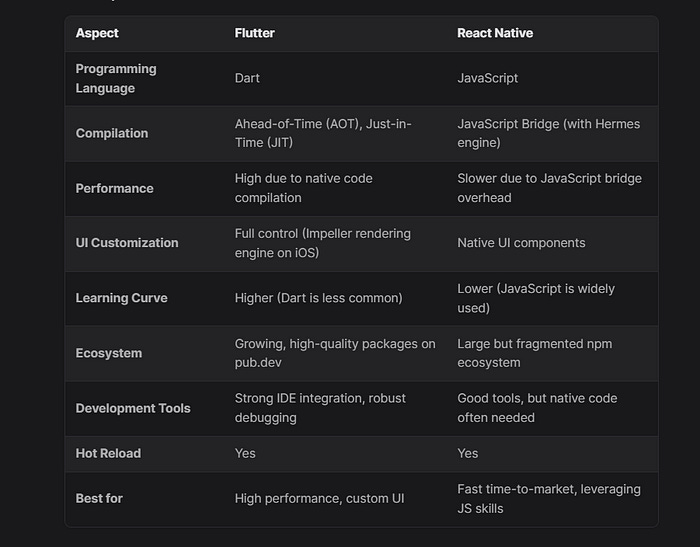
Conclusion
The decision between Flutter and React Native is based on your individual project needs and the trade-offs you’re willing to make.
Choose Flutter if performance is critical or if your app requires a unique, professional user interface. Flutter’s ability to compile directly to native code provides a performance advantage that React Native may struggle to match without major improvements.
Choose React Native if you want to take advantage of your team’s current JavaScript experience, get to market rapidly, or create an app that relies significantly on native UI components. React Native enables rapid development using a variety of packages and tools, but complex projects may require additional performance tweaking.
A Note From the Author
Thank you so much for taking the time to read the story. If you found my article helpful and interesting, please share your thoughts in the comment section, and don’t forget to share and clap 😊